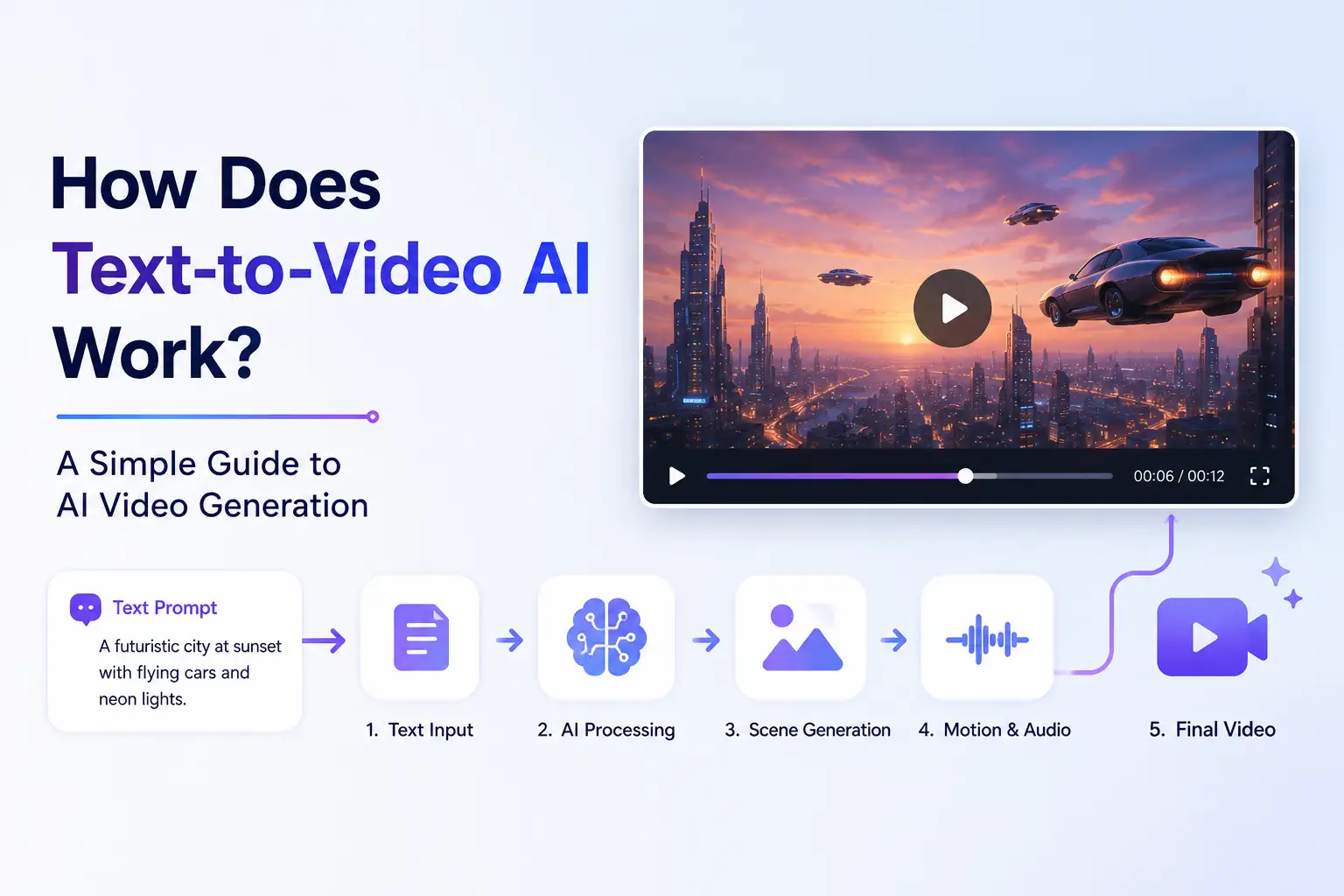
How Does Text-to-Video AI Work? A Simple Guide to AI Video Generation
Text-to-video AI can turn a written idea into a video without requiring you to film footage, animate scenes manually, or build every visual from scratch.
But what actually happens between typing a prompt and receiving a finished video?
At a high level, text-to-video AI interprets your written instructions, translates them into visual concepts, generates a sequence of frames, creates motion between those frames, and produces a video based on the instructions you provided. Depending on the workflow, audio, voice, and other elements may also be included.
Understanding how this process works makes it easier to use AI video generation effectively and set realistic expectations about what the technology can and cannot do.
What Is Text-to-Video AI?
Text-to-video AI is a form of generative AI that creates video from written instructions.
Instead of starting with existing footage, you describe what you want to see. Your description might include a subject, setting, action, visual style, camera direction, or other creative details.
For example, you might describe a product being presented in a modern studio, a city scene at sunset, or an educational animation explaining a particular concept.
The AI processes the written instruction and generates visual content that corresponds to it.
Text-to-video is therefore different from traditional video production. Instead of capturing or manually creating every visual element, the creator provides the direction and the AI generates the content.
How Does Text-to-Video AI Work?
The exact technology varies between AI systems, but the overall workflow can be understood as a series of steps.
Text prompt → AI interpretation → Visual concept → Frame generation → Motion and consistency → Audio and other elements → Refinement → Final video
Here is what happens at each stage.
1. You Provide a Text Prompt
Everything starts with an instruction.
The prompt tells the AI what you want the resulting video to contain. It can be a simple description or a more detailed creative direction.
A prompt might describe:
- The subject of the video
- What the subject is doing
- The setting
- The visual style
- The mood
- Camera movement
- Other creative requirements
The clearer the intended result, the easier it is to communicate the desired outcome.
The prompt does not necessarily need to describe every individual frame. The AI system uses the information provided to determine what the resulting video should look like.
2. AI Interprets the Text
The system then processes the written instruction and identifies the important concepts within it.
For example, a prompt could describe a person walking through a city street while carrying a product. The system needs to understand concepts such as:
- Who or what is being shown
- Where the scene takes place
- What is happening
- How the scene should look
- Which visual elements are important
This interpretation is what allows a written description to become a visual instruction.
The AI is not simply looking for individual words and placing objects into a scene. It needs to interpret the relationships between the different elements of the request.
3. The AI Builds the Visual Concept
After interpreting the prompt, the system generates the visual content needed to represent the instruction.
This can involve determining the appearance of the subject, environment, composition, lighting, style, and other visual characteristics.
For example, if the prompt describes a product in a premium studio environment, the generated scene needs to represent both the product and the surrounding environment in a way that matches the instruction.
The result is not a traditional video storyboard created manually. The AI generates the visual content based on the relationships and concepts it has interpreted from the prompt.
4. The Video Frames Are Generated
A video is different from a single image because it consists of a sequence of visual frames.
An image generator only needs to produce one finished visual. A video generation system needs to produce a sequence that changes over time.
This makes the task considerably more complex.
The system needs to generate visual information across multiple moments while maintaining enough consistency for those moments to appear as one continuous video.
For example, if a person appears in the first part of a generated scene, the person should remain recognizably consistent as the video progresses.
5. Motion and Temporal Consistency Are Created
Generating individual frames is only part of creating a convincing video.
Those frames also need to work together as a moving sequence.
The system needs to account for things such as:
- Movement
- Transitions
- Subject consistency
- Scene continuity
- Changes over time
This is one of the reasons AI video generation is more challenging than simply generating a series of unrelated images.
A video can contain the right subject and environment but still look unnatural if movement between moments is inconsistent.
For example, an object may change shape, a person's appearance may shift, or movement may not follow the physical behavior a viewer expects.
Modern text-to-video systems attempt to maintain visual and temporal relationships throughout the generated sequence, but the results can vary depending on the complexity of the request and the capabilities of the generation system.
6. Audio and Other Elements May Be Added
Depending on the AI video workflow, the final result may also include audio-related elements.
These can include:
- Voice
- Dialogue
- Sound
- Music
- Other supporting elements
Not every text-to-video system handles these elements in the same way. Some workflows focus primarily on generating the visual video, while others can incorporate additional audio or narration capabilities.
The important point is that AI video creation can involve more than generating moving images. Modern workflows can combine multiple elements to create a more complete piece of content.
7. The Video Is Refined and Exported
The first generated result is not always the final result.
Creators may review the output and decide that something needs to change. They might adjust the instructions, modify the desired visual direction, or generate another version.
This review and refinement process is an important part of AI video creation.
AI makes video generation faster and more accessible, but human judgment still matters. The creator ultimately decides whether the generated result communicates the intended idea and meets the requirements of the project.
Once the result is satisfactory, the video can be prepared for its intended use.
Why Does Text-to-Video AI Sometimes Produce Strange Results?
AI-generated video can sometimes contain results that look unnatural or different from what the creator expected.
This can happen for several reasons.
Inconsistent Subjects
A subject may change appearance between different moments in the video.
For example, clothing, facial characteristics, object shapes, or other details may not remain perfectly consistent.
Unnatural Movement
Movement can sometimes look unrealistic, particularly when the prompt describes complicated actions or interactions.
Incorrect Interpretation
The AI may interpret an instruction differently from how the creator intended it.
A prompt that seems clear to a person can still contain relationships or details that are difficult for a generative system to represent accurately.
Visual Artifacts
Generated video can sometimes contain unusual visual details or inconsistencies.
These may become more noticeable when the scene is complex or contains many moving elements.
Complex Instructions
The more complicated the requested scene becomes, the more difficult it can be to maintain consistency across all of its elements.
This is why a simple, well-defined concept can sometimes produce a more reliable result than a single prompt containing many complicated requirements.
What Affects the Quality of an AI-Generated Video?
The quality of a generated video depends on more than simply entering a prompt.
Several factors can influence the result.
Clarity of the Instruction
A clear instruction gives the AI a better understanding of what the creator wants to produce.
The prompt should communicate the important aspects of the scene without introducing unnecessary complexity.
Complexity of the Scene
A simple scene with a small number of elements can be easier to generate consistently than a complicated scene involving many subjects, interactions, and changes.
Complexity does not automatically produce a better video.
Desired Motion
Movement introduces another layer of difficulty.
A scene involving simple camera movement may be easier to generate consistently than a scene requiring several subjects to interact with one another while moving through a changing environment.
Visual Consistency
A convincing video needs continuity.
Subjects, environments, styles, and other important visual elements should remain sufficiently consistent throughout the sequence.
AI Model and Generation Capabilities
Different AI video systems can produce different results.
Their capabilities, generation methods, controls, and strengths can vary.
If you want to understand how different text-to-video AI models compare, see our guide to text-to-video AI models.
Refinement Workflow
Generation is often an iterative process.
Reviewing the output and refining the instructions can help creators move closer to the intended result.
The goal is not simply to generate a video. It is to generate a video that actually serves the intended purpose.
Text-to-Video AI vs. Image-to-Video AI
Text-to-video and image-to-video are related, but they begin with different types of input.
Text-to-Video AI
Text-to-video starts with a written instruction.
You describe what you want to see, and the AI generates the visual video based on that description.
This is useful when you are starting with an idea rather than existing visual material.
Image-to-Video AI
Image-to-video starts with an existing image.
Instead of creating the visual starting point entirely from text, the AI uses the image as the foundation and introduces movement or transforms it into a video.
This can be useful when you already have a product image, photograph, illustration, or other visual asset that you want to animate.
Which Workflow Should You Use?
The right approach depends on what you are starting with.
If you have an idea but no visual asset, text-to-video can provide a way to turn that idea into a video.
If you already have an image that you want to bring to life, image-to-video may be the more natural workflow.
Both approaches can be part of a broader AI video creation process.
What Can You Use Text-to-Video AI For?
Text-to-video AI can be used across a range of creative and business workflows.
Marketing
Marketing teams can use generated video to develop campaign concepts, promotional content, and advertising creatives.
Instead of producing every visual from scratch, teams can explore ideas and create variations using AI-generated video.
Social Media
Short-form video is an important format for social media.
Text-to-video can help creators turn ideas, concepts, and written directions into visual content that can be adapted for different social platforms.
Education
Educational teams can use AI-generated video for explainers, instructional material, and visual demonstrations.
A written concept can be turned into a visual sequence that helps communicate an idea more clearly.
Business Communication
Businesses can use generated video for presentations, explanations, internal communication, and other visual content.
This can be particularly useful when an idea is easier to communicate through visuals than through text alone.
Content Creation
Content creators can use text-to-video AI to turn written ideas into visual content.
A concept, script, or description can become a starting point for a video without requiring a traditional production process for every piece of content.
What Are the Limitations of Text-to-Video AI?
Text-to-video AI has become much more capable, but it is not a replacement for human judgment in every situation.
Some limitations remain.
Precise Control
Getting an AI-generated video to match an exact creative vision can require multiple iterations.
Subject Consistency
Maintaining exactly the same appearance for subjects throughout a sequence can still be challenging.
Complex Scenes
Scenes involving many subjects, interactions, or detailed environmental changes can be more difficult to generate consistently.
Realistic Physics
Generated movement does not always behave exactly as it would in the physical world.
Exact Text Rendering
Text appearing inside a generated scene can sometimes be inconsistent or inaccurate.
Repeatability
Generating a similar concept again does not necessarily guarantee an identical result.
Human Review
Generated content still benefits from human review.
Creators need to evaluate whether the video is visually accurate, appropriate for its intended audience, and effective for its purpose.
The most useful way to think about text-to-video AI is therefore not as a replacement for creative direction, but as a tool that can make the process of turning ideas into video faster and more accessible.
How Businesses Can Use Text-to-Video AI
Text-to-video AI can support businesses at several stages of the content creation process.
Marketing teams can use it to explore creative concepts and produce promotional content.
Agencies can use it to develop visual ideas and create content for different clients and campaigns.
Content teams can use it to turn written concepts into video and create additional formats from existing ideas.
Startups can use AI-generated video when they need visual content without building a large traditional production workflow.
Ecommerce businesses can explore product-focused video concepts and promotional content.
Creators and professionals can use text-to-video AI to turn their ideas into visual content more efficiently.
The common benefit is not simply that AI generates video. It is that written ideas can move into a visual production workflow more quickly.
Creating Videos With AI in Klyra
Klyra's AI Video Generator gives creators a way to work with AI video generation through both text-to-video and image-to-video workflows.
That means you can start with a written idea when you want to generate a video from a description, or begin with an existing image when you want to introduce motion to visual content.
Klyra also approaches AI video creation as part of a broader AI workspace rather than treating every AI capability as a completely separate tool.
For teams and creators working across different types of AI-generated content, this can make it easier to move from an idea to the appropriate creation workflow.
Start CreatingFrequently Asked Questions About Text-to-Video AI
What is text-to-video AI?
Text-to-video AI is generative AI technology that creates video from written instructions. A user provides a prompt, description, or other text input, and the system generates visual content based on that instruction.
How does text-to-video AI work?
Text-to-video AI interprets a written prompt, determines the visual content it represents, generates a sequence of frames, creates movement and continuity between them, and produces a video. Depending on the workflow, audio and other elements may also be included.
Can AI generate a video from a text prompt?
Yes. Text-to-video AI is designed to turn written prompts into generated video. The resulting quality depends on the prompt, the complexity of the request, and the capabilities of the AI generation system being used.
How does AI turn text into video?
AI processes the written instruction to identify subjects, actions, settings, styles, and other relevant information. It then uses that interpretation to generate visual content and a sequence of frames that form the resulting video.
What is the difference between text-to-video and image-to-video?
Text-to-video starts with a written instruction and generates the video from that description. Image-to-video starts with an existing image and uses AI to add movement or transform the image into video.
Can text-to-video AI generate audio?
Some AI video workflows can incorporate audio, voice, dialogue, or music, while others focus primarily on visual generation. The capabilities depend on the system and workflow being used.
Why do AI-generated videos sometimes look unnatural?
AI-generated video can sometimes have inconsistent subjects, unusual movement, visual artifacts, or incorrect interpretations of complex instructions. These issues can result from the difficulty of maintaining visual and temporal consistency across a generated sequence.
What can text-to-video AI be used for?
Text-to-video AI can be used for marketing, social media content, education, business communication, advertising, and general content creation. It can help turn written ideas into visual content without relying entirely on traditional video production.