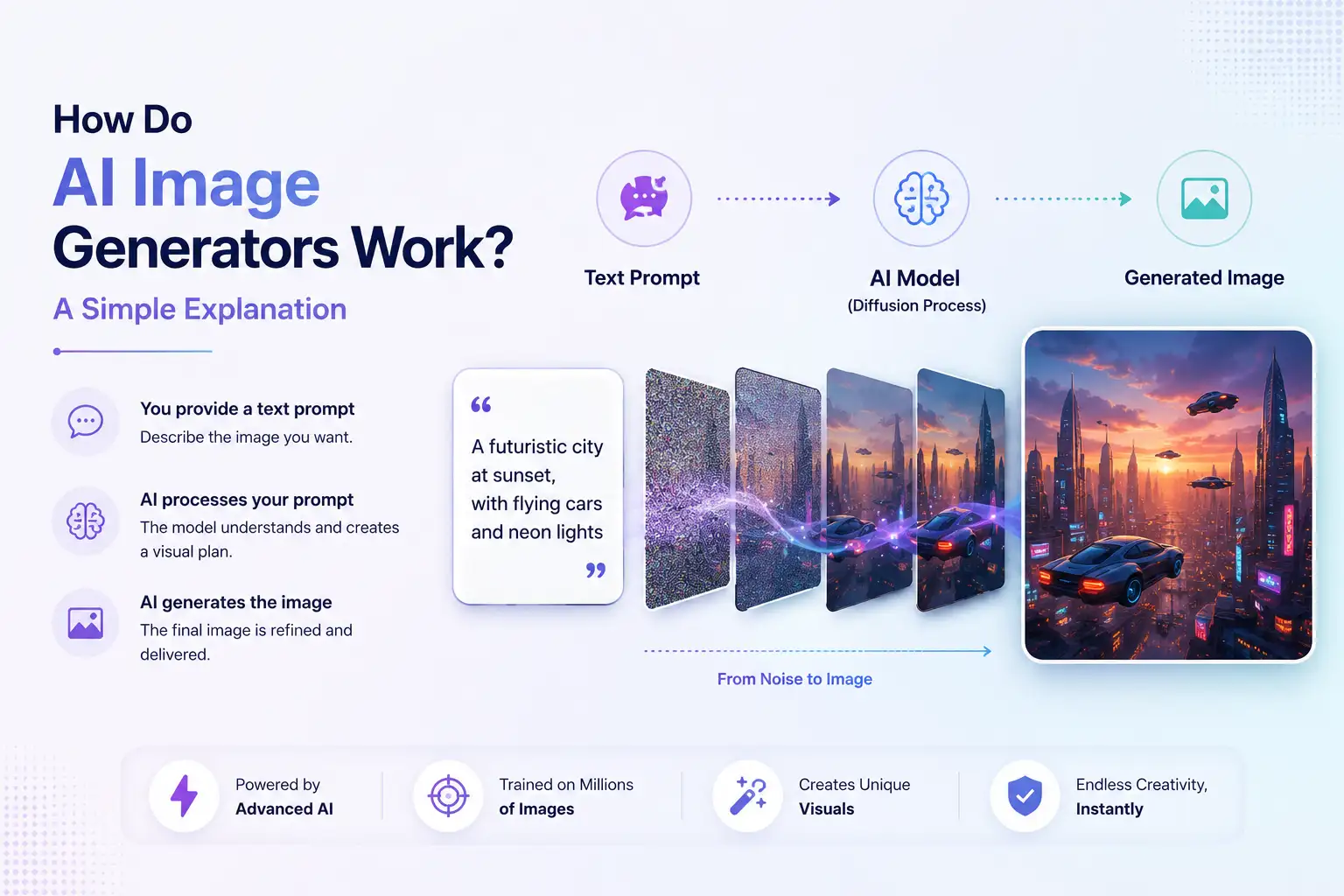
How Do AI Image Generators Work? A Simple Explanation
AI image generators can turn a written description into an image in seconds. But they do not work like a traditional search engine that finds an existing picture matching your request. They use trained generative AI models to interpret your prompt, represent the concepts it describes, and progressively construct a new image.
Modern AI image generators commonly use diffusion-based approaches. The system starts from noise or a related latent representation and repeatedly transforms it under the guidance of your prompt until a coherent image emerges.
In simple terms:
Text prompt → AI interprets the prompt → Visual representation → Noise → Denoising → Generated image
Understanding this process makes it easier to understand why prompts matter, why different models produce different results, and why AI-generated images sometimes need several iterations.
How Do AI Image Generators Work?
At a high level, an AI image generator combines a trained model with an input such as a text prompt, reference image, or other creative instructions.
When you enter a prompt, the system first processes the language. It identifies the concepts, objects, relationships, and visual characteristics described in the request. That information is then used to guide the image-generation process.
For many modern systems, the generation process involves diffusion.
Instead of directly drawing the requested image from scratch in the way a person might use a design application, the model works through a process of transforming noise into an increasingly structured visual representation.
A simplified version looks like this:
- You enter a prompt.
- The system interprets the prompt.
- The prompt is converted into a representation the model can use.
- Generation begins from noise or a related latent representation.
- The model progressively removes noise.
- Shapes, objects, composition, and other visual features emerge.
- Details are refined.
- The final image is produced.
The exact architecture and generation process varies between AI image models, but this gives a useful mental model for understanding how text-to-image generation works.
How AI Turns a Text Prompt Into an Image
The first challenge is understanding what the user actually wants.
Consider a prompt such as:
A modern glass house overlooking a snowy mountain lake at sunrise, cinematic photography.
The system needs to extract much more than individual words. It needs to work with concepts such as:
- A glass house
- A mountain lake
- Snow
- Sunrise
- A cinematic visual style
- Relationships between the different elements
The model uses learned representations to connect language with visual concepts.
Understanding the Text Prompt
A prompt can contain information about the subject, environment, composition, style, lighting, colors, camera perspective, and other characteristics.
For example, changing:
A house beside a lake
to:
A minimalist glass house overlooking a calm alpine lake at sunrise, wide cinematic composition
provides considerably more visual direction.
The AI does not interpret these words in exactly the same way a person does. Instead, the model uses representations learned during training to associate language with patterns and concepts relevant to visual generation.
Turning Text Into a Representation the Model Can Use
Before the image-generation process can use the prompt, the text needs to be converted into a representation that the model can work with.
This is where a text encoder can play an important role.
A text encoder transforms language into numerical representations that capture information about the words and their relationships. The image-generation system can then use these representations to guide the generation process.
This is one reason AI image generation is more sophisticated than simply matching keywords.
The system needs to use the relationships between different parts of the prompt to determine what kind of image should emerge.
Using the Prompt to Guide Image Generation
The prompt acts as guidance throughout the generation process.
If you ask for a red sports car on a wet city street at night, the model needs to generate visual characteristics associated with:
- A sports car
- The color red
- A city environment
- Nighttime lighting
- A wet surface
- The relationships between these elements
The resulting image is therefore influenced by the entire prompt rather than by one keyword in isolation.
How Diffusion Models Generate Images
One of the most important concepts behind modern AI image generation is the diffusion model.
The basic idea is easier to understand than the terminology suggests.
A diffusion-based image-generation system can learn how visual information is transformed between structured images and noise. During generation, it uses this learned capability to progressively transform noise into an image that matches the provided conditions.
What Is Noise?
In this context, noise is a representation containing random or unstructured visual information.
Imagine looking at a screen filled with random visual patterns. There is no recognizable scene or subject.
A diffusion model can learn a process for moving from this kind of noisy representation toward a structured image.
Starting With Noise
During generation, the system can begin with a noisy or latent representation.
The prompt provides guidance about what the final result should represent.
For example, if the prompt describes:
A golden retriever running through a green meadow
the generation process is guided toward producing visual patterns consistent with those concepts.
Gradually Removing Noise
The model then performs a series of denoising steps.
At each stage, it estimates how the current representation should change so that it becomes more consistent with the requested result.
Early stages may establish broad visual structure.
Later stages can refine:
- Shapes
- Edges
- Textures
- Lighting
- Colors
- Smaller details
The exact process varies between models, but the general concept is that the image becomes progressively more structured.
Turning the Process Into a Finished Image
After the generation process has completed its required steps, the resulting representation is converted into the final image.
What began as noise or an abstract latent representation has become a recognizable visual scene.
This is why the process is often described as denoising.
What Happens During AI Image Generation?
The entire process can be understood as a series of stages.
Step 1: You Enter a Prompt
The process begins with an instruction.
This might be a simple description:
A futuristic city at night.
Or it might contain much more detail:
A futuristic coastal city at night, illuminated skyscrapers, elevated trains, reflective streets, cinematic lighting, wide-angle composition.
The amount and type of information in the prompt can influence the resulting image.
Step 2: The AI Interprets the Prompt
The system processes the text and converts it into representations that the image-generation model can use.
The model considers concepts and relationships contained in the prompt rather than simply treating each word as an independent command.
Step 3: Generation Begins
The image-generation process begins from noise or a related latent representation, depending on the model and workflow.
At this point, there is not yet a finished picture corresponding to the prompt.
Step 4: The Model Removes Noise
The model performs iterative transformations that progressively move the representation toward the requested image.
The prompt continues to guide this process.
Step 5: Visual Structure Emerges
As the process continues, recognizable structure begins to form.
The model may establish the broad composition first, followed by increasingly detailed visual features.
Step 6: Details Are Refined
Later stages can refine aspects such as:
- Texture
- Lighting
- Edges
- Color relationships
- Fine visual details
Step 7: The Final Image Is Produced
The final representation is decoded into an image that can be displayed, saved, edited, or further refined.
The entire process can happen remarkably quickly, even though the underlying computation involves many steps.
How AI Image Models Learn to Generate Images
An AI image generator needs to learn relationships between language and visual information before it can generate useful images.
This happens during model training.
The exact training methods and datasets differ between models, so there is no single training process that applies to every AI image generator. However, the general objective is to learn useful representations of visual concepts and their relationships with language or other forms of input.
Learning Relationships Between Images and Text
During training, models can learn associations between visual information and descriptions.
Over time, these learned representations can capture relationships involving concepts such as:
- Objects
- People
- Places
- Colors
- Styles
- Actions
- Visual characteristics
This allows a generation system to associate language with visual patterns.
Learning Visual Patterns
The model does not simply memorize a list of objects.
It learns statistical patterns that can help it represent aspects of images, including shapes, textures, compositions, and relationships between visual elements.
For example, it can learn that certain visual patterns commonly correspond to concepts such as a tree, a building, a car, or a sunset.
Turning Learned Patterns Into New Images
During generation, the model uses what it learned to produce a new visual result.
This is an important distinction.
An AI image generator is not simply searching a database for an image that matches your prompt. A generative model uses learned representations to construct an output based on the instructions and generation conditions.
What Are Diffusion Models?
Diffusion models are generative models designed around a process involving noise and denoising.
During training, a diffusion system can learn how images relate to increasingly noisy versions of those images. During generation, the process is effectively used in the opposite direction: starting from noise and progressively moving toward a structured result.
The model learns what changes are needed at each stage to produce increasingly coherent visual information.
The prompt can condition this process, helping guide the generated image toward the requested subject, style, or composition.
Diffusion models are particularly important because they provide a flexible framework for generating complex visual outputs from conditions such as text.
What Role Do Text Encoders and Attention Play?
Generating an image from a sentence requires the system to connect language with visual concepts.
Two concepts that often appear in explanations of these systems are text encoders and attention.
What Is a Text Encoder?
A text encoder converts text into a representation that an AI system can use.
Instead of treating a prompt as plain text, the encoder transforms it into numerical information representing aspects of its meaning and relationships.
This gives the image-generation system information it can use while producing the image.
What Is Attention?
Attention mechanisms help AI models determine which parts of an input are relevant to other parts.
This can be useful when a prompt contains multiple objects and relationships.
Consider:
A small red boat floating beside a large wooden dock.
The system needs to distinguish the boat from the dock, understand their attributes, and represent their relationship.
Attention mechanisms help models work with these relationships rather than treating every word as completely independent.
Why These Components Matter
Prompt interpretation is fundamental to text-to-image generation.
If a system cannot effectively connect language with the appropriate visual concepts, the generated image may not accurately reflect the user's request.
Text representations and attention mechanisms are therefore important parts of the broader process that connects language with visual generation.
What Is the Difference Between Diffusion Models and GANs?
Diffusion models are not the only approach to generative image creation.
Another important family of generative models is GANs, or Generative Adversarial Networks.
What Are GANs?
GANs use two neural networks that work against each other during training:
- A generator, which attempts to create realistic outputs
- A discriminator, which attempts to distinguish generated outputs from real examples
Through this process, the generator can become increasingly capable of producing realistic results.
How GANs Differ From Diffusion Models
The fundamental generation process is different.
GANs use the interaction between a generator and discriminator, while diffusion models work through a learned process involving noise and denoising.
Both approaches can generate visual content, but diffusion-based methods have become especially important in modern image-generation workflows.
Why Diffusion Models Matter Today
Diffusion models provide a powerful way to condition generation on information such as text prompts.
They can progressively construct complex visual outputs while allowing the generation process to be guided toward a requested concept.
The important point for most users is not which architecture is theoretically superior. It is understanding that different AI image models can use different approaches, and those differences can affect how they generate and respond to prompts.
Why Do AI-Generated Images Sometimes Get Things Wrong?
AI image generators can produce impressive results, but they are not guaranteed to interpret every instruction perfectly.
Several factors can cause unexpected results.
Ambiguous Prompts
If a prompt can be interpreted in multiple ways, the model has to determine which interpretation is most appropriate.
Adding useful context can reduce ambiguity.
Complex Relationships
Images containing many objects and detailed relationships can be difficult to generate accurately.
For example, a prompt might specify several people, objects, positions, and interactions. Maintaining all of those relationships consistently can be challenging.
Fine Details
Small visual elements can sometimes be inconsistent.
This can include:
- Fingers and hands
- Small objects
- Fine patterns
- Tiny text
- Complex backgrounds
Text Rendering
Generating readable text inside an image has historically been a challenge for image-generation systems, although newer models have improved substantially.
Results can still vary depending on the model and the complexity of the requested text.
Model Limitations
Every AI image model has limitations.
Different models can produce different results from the same prompt, which is why choosing an appropriate model and refining the generation can matter as much as the wording of the prompt.
What Affects the Quality of an AI-Generated Image?
The final result depends on more than the prompt alone.
The Prompt
A clear prompt gives the model more useful direction.
The subject, environment, visual style, composition, and other relevant details can all influence the output.
The AI Model
Different models have different strengths.
One model may be particularly strong at photorealistic imagery, while another may perform better for illustration, creative styles, typography, or particular editing workflows.
Image Resolution and Aspect Ratio
The desired dimensions and aspect ratio can influence how the composition is generated.
A prompt intended for a wide landscape image may produce a different composition when generated in a square format.
Style and Visual Direction
Describing the desired visual direction can help guide the result.
Depending on the system, this might include information about:
- Lighting
- Color
- Composition
- Mood
- Artistic approach
- Camera perspective
Generation Settings
Many AI image tools provide additional controls that influence generation.
The available settings vary between systems, so users should treat them as creative controls rather than universal technical parameters.
Reference Images
Some AI image-generation workflows allow users to provide reference images.
A reference can supply additional visual information that is difficult to communicate through text alone.
Iteration and Refinement
AI image generation is often an iterative process.
A first result can reveal what works and what needs to change. Users can then adjust the prompt, settings, model, or reference material and generate another version.
How to Get Better Results From an AI Image Generator
You do not always need a highly complicated prompt to get useful results.
The goal is to provide the model with the information that matters most.
Start With a Clear Subject
Begin by identifying what the image should contain.
For example:
A modern electric sports car
is a clearer starting point than a vague instruction such as:
Something futuristic.
Describe the Desired Visual Outcome
Add relevant information about the environment, style, lighting, or composition.
For example:
A modern electric sports car parked on a rain-soaked city street at night, cinematic lighting.
Add Relevant Context
Context can help the model understand how different elements should relate to one another.
Instead of listing unrelated visual terms, describe the scene you want to create.
Use Reference Images When Appropriate
When a tool supports reference images, they can provide additional guidance about composition, subject appearance, style, or other visual characteristics.
Generate Variations
If the first result is close but not quite right, try another variation.
Small changes can produce significantly different outputs.
Refine Promising Results
You do not necessarily need to start over.
If a result has the right composition but needs a different subject, style, or detail, use the available editing or refinement capabilities when supported.
AI Image Generation vs Traditional Image Creation
AI image generation changes the way visual content can be created, but it does not eliminate the need for creative direction.
Traditional Image Creation
Traditional workflows can involve:
- Sketching
- Photography
- Illustration
- Design software
- Manual editing
- Compositing
- Retouching
These workflows can provide precise control, but they may require considerable time and specialized skills.
AI Image Generation
AI image generation allows users to describe an intended result and generate visual options from that description.
Instead of manually constructing every visual element, the user can work through prompts, references, variations, and refinements.
AI-Assisted Creative Workflows
In practice, AI and traditional methods can work together.
A designer might generate an initial concept with AI, refine it manually, combine it with existing assets, or use AI editing to make targeted changes.
The most useful workflow depends on the project, the required level of control, and the desired outcome.
How Klyra AI Uses Multiple Image Models
Understanding how AI image generation works is useful, but the practical question is often simpler:
How can you actually create and refine images without switching between multiple tools?
Klyra AI's AI Image Studio brings image generation and editing capabilities into a unified creative workspace. Instead of treating image generation as an isolated step, the workflow can move from creating an image to reviewing, refining, and editing it in the same environment.
The advantage of a unified workflow is that you can focus on the creative outcome rather than managing a collection of separate AI tools.
Klyra's image-generation workflow can support activities such as:
- Generating images from prompts
- Exploring different visual directions
- Creating variations
- Editing generated images
- Refining creative outputs
- Working with different image-generation models
This makes the technology explained in this article practical. The underlying models handle the complex generation process, while the workspace gives you a place to direct and refine the result.
Start CreatingFrequently Asked Questions
How do AI image generators work?
AI image generators use trained generative models to transform instructions such as text prompts into visual outputs. Modern systems commonly use processes such as diffusion, where the model progressively transforms noise or a related representation into an image guided by the prompt.
How does AI create images from text?
The system first processes the text prompt and converts it into a representation the image-generation model can use. The model then uses that information to guide the generation process, progressively creating visual structure that corresponds to the requested concepts.
How are AI images generated?
Many modern AI image generators use diffusion-based processes. Generation can begin from noise or a related latent representation, which is progressively transformed through multiple steps until a coherent image is produced.
What is a diffusion model?
A diffusion model is a type of generative AI model that learns relationships between structured data and noise. For image generation, the learned process can be used to progressively transform noise into a structured image.
Do AI image generators understand images?
AI image generators do not understand images in exactly the same way humans do. They use learned numerical representations and patterns that allow them to associate visual information with concepts, language, and other inputs.
Why do AI-generated images sometimes look wrong?
AI-generated images can contain mistakes because models may struggle with ambiguous prompts, complex relationships, fine details, text, unusual objects, or other situations that are difficult to represent accurately.
Can AI generate realistic images?
Yes. Modern AI image generators can produce highly realistic images, although results vary depending on the model, prompt, generation settings, and subject. Realism is only one possible creative outcome, with many systems also supporting illustrations, stylized imagery, concepts, and other visual approaches.
What is the difference between AI image generation and AI image editing?
AI image generation creates new visual content based on an instruction or other input. AI image editing modifies an existing image, such as changing an object, extending the image, removing an element, or altering its appearance. Some AI tools support both workflows.
Conclusion
AI image generators can appear almost magical because a short description can become a detailed image within seconds. Underneath that simple experience, however, there is a sophisticated generative process.
The system interprets the prompt, connects language with learned visual concepts, and uses a generative model to construct the requested image. In many modern systems, diffusion plays a central role by progressively transforming noise or a related representation into increasingly structured visual information.
The quality of the final result depends on several factors, including the prompt, model, generation settings, references, and refinement process.
Understanding how AI image generators work makes it easier to use them effectively. And when the goal is to move from experimentation to a repeatable creative workflow, a unified environment can make the process much simpler.
With Klyra AI, you can explore AI-powered image generation and editing in one creative workspace, helping you move from an idea to a finished visual without managing multiple disconnected tools.
Start Creating